

Bring Your Own Key (BYOK)
Encrypt Zep data with a customer-managed AWS KMS key
Enterprise Add-on. Contact sales to enable BYOK for your account.
Overview
Bring Your Own Key (BYOK) enables you to encrypt your data at rest in Zep using your own Customer Master Key (CMK) stored in your AWS KMS account. You control the key policy and can revoke Zep’s future AWS KMS access.
BYOK is the Cloud + Your Own Keys deployment model: Zep’s managed service with encryption keys you control. For a full network and compliance boundary inside your own VPC, see Bring Your Own Cloud (BYOC).
With BYOK enabled:
- Your data is encrypted using keys derived from your CMK
- Zep never has direct access to your CMK—only cross-account usage rights
- You control key rotation and the KMS access policy.
- AWS CloudTrail records the AWS KMS API activity in your account.
Do not send data that must be encrypted with your key until BYOK is active for your account. BYOK becomes active when you complete Step 3.
Zep cannot re-encrypt data that Zep stored before BYOK activation. That data does not become encrypted with your key after activation.
Prerequisites
- An AWS account with permissions to create and manage KMS keys
- Your Zep account UUID (available from your Zep dashboard)
Setup instructions
Step 1: Create a KMS key
Create a symmetric KMS key in your AWS account. Zep Cloud operates in us-west-2, so your key must be accessible from that region:
- Single-region key: Create directly in
us-west-2 - Multi-region key: Create in any region and replicate to
us-west-2
Note the KeyId or Arn from the response—you’ll need this for the next steps.
Optionally, create an alias for easier reference:
Using Terraform
Step 2: Grant Zep cross-account access
Configure your KMS key policy to allow Zep’s services to use your key for BYOK operations.
First, retrieve your AWS account ID:
Then create and apply the key policy. Replace <your-key-id> with your KMS key ID from Step 1, and <your-aws-account-id> with the 12-digit account ID from above:
Using Terraform
Step 3: Configure BYOK in Zep
Navigate to Account > Encryption in your Zep dashboard and enter your KMS Key ARN. The region and AWS account ID will be extracted automatically from the ARN.
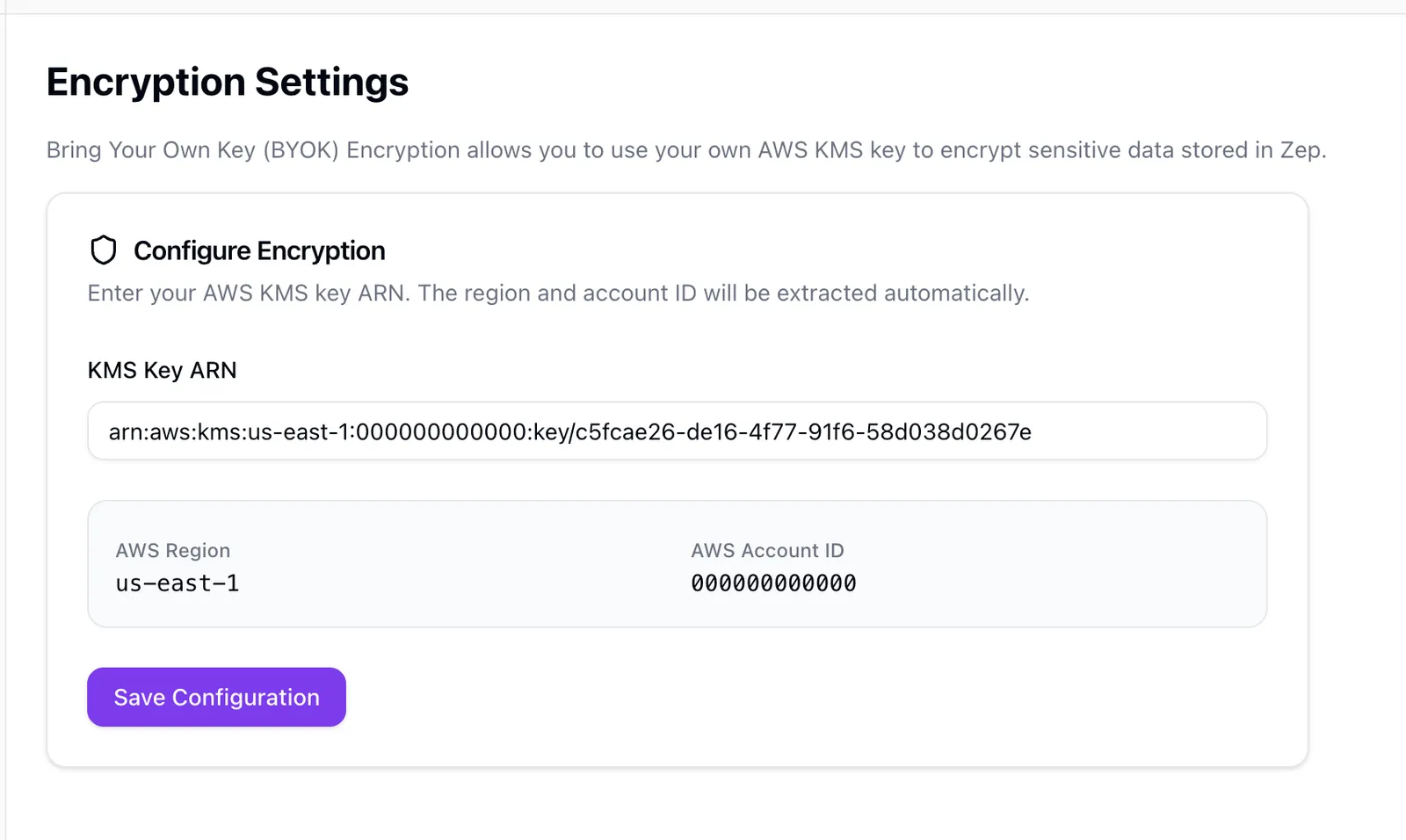
Click Save Configuration to enable BYOK encryption. Zep will validate connectivity to your KMS key.
If validation fails, review your KMS key policy to ensure the AllowZepBYOKDescribeKey and AllowZepBYOKCryptoOpsScoped statements are correctly configured and that your key ARN is accurate.
After activation, Zep encrypts new data with your key. Zep does not re-encrypt data that Zep stored before activation.
Key rotation
AWS KMS supports automatic key rotation for customer-managed keys. When enabled, AWS automatically creates new key material annually while retaining old material for decryption.
To enable automatic rotation:
If using Terraform, key rotation is already enabled via enable_key_rotation = true in the example above.
No action is required from Zep when you rotate keys—AWS KMS handles this transparently.
When AWS KMS rotates your key, it creates a new key version but retains all previous versions. Zep does not re-encrypt existing data with new key versions—data remains encrypted with the key version that was active at the time of encryption.
- Do not delete old key versions—this will result in permanent data loss for any data encrypted with those versions
- If you need to delete old key versions for compliance reasons, contact Zep first to coordinate data re-encryption
Revoking access
To revoke Zep’s access to your data:
- Remove the
AllowZepBYOKDescribeKeyandAllowZepBYOKCryptoOpsScopedstatements from your KMS key policy - Contact Zep to disable BYOK for your account
After revocation:
- A runtime can continue to use a cached branch key until its cache entry expires. The current cache duration is up to one hour.
- An operation that requires a new AWS KMS call will fail after the policy change takes effect.
- Existing encrypted data will become inaccessible when Zep no longer has a usable cached key.
- Your account may be suspended until access is restored or BYOK is disabled
Audit trail
AWS CloudTrail records AWS KMS API calls made against your key. Local encryption and decryption operations that use a cached branch key do not call AWS KMS and do not create a CloudTrail KMS event.
You can use CloudTrail to monitor and alert on key usage patterns.
FAQ
Can Zep access my data in plaintext?
Routine operations do not require manual access to plaintext data. Automated services decrypt data within isolated, audited environments.
A customer-approved incident investigation requires separation of duties, multiple approvals, and audit logs. You can disable your customer managed key (CMK) to block decryption.
What happens if I disable or delete my CMK?
All encrypted data becomes unreadable. This is by design: the key is the final arbiter of access. Ensure you have internal procedures for emergency restores before disabling or deleting a key.
Does BYOK introduce latency?
Zep caches branch keys in memory. An operation can make an AWS KMS call and add latency when the required key is not in the cache. Local encryption and decryption use the cached key while it is available.
Can I rotate keys without downtime?
Yes. Enable automatic rotation in AWS KMS. New encryption operations use the new key material, and AWS KMS retains prior versions for decryption.
Zep does not re-encrypt existing ciphertext during automatic rotation. Disabling the key blocks new AWS KMS operations after the policy change takes effect. A runtime can continue to use a cached branch key until it expires.
Is BYOK applied to every data store?
Yes. All persistent storage and backups for your tenant use envelope encryption derived from your CMK. Stateless services process data in memory and never persist plaintext content.
Where is my data stored?
Customer data remains within us-west-2, Zep Cloud’s region. Data in motion is encrypted with TLS 1.3, and at rest it is encrypted using keys derived from your CMK.
How do I audit KMS activity?
Review the AWS CloudTrail records for AWS KMS API activity against your CMK. CloudTrail does not record each local encryption or decryption operation that uses a cached branch key.
Who is responsible for key lifecycle management?
You own the CMK, including rotation, revocation, and IAM policy management. Zep monitors for key state changes and will notify your administrators if a key action affects service availability.
Support
For assistance with BYOK setup, contact your Zep account team or email support@getzep.com.