

Key Concepts
Looking to just get coding? Check out our Quickstart.
Summary
Zep is a context engineering platform that systematically assembles personalized context—user preferences, traits, and business data—for reliable agent applications. Zep combines agent memory, Graph RAG, and context assembly capabilities to deliver comprehensive personalized context that reduces hallucinations and improves accuracy.
What is Context Engineering?
Context Engineering is the discipline of assembling all necessary information, instructions, and tools around a LLM to help it accomplish tasks reliably. Unlike simple prompt engineering, context engineering involves building dynamic systems that provide the right information in the right format so LLMs can perform consistently.
The core challenge: LLMs are stateless and only know what’s in their immediate context window. Context engineering bridges this gap by systematically providing relevant background knowledge, user history, business data, and tool outputs.
Using user chat histories and business data, Zep automatically constructs a temporal knowledge graph for each of your users. The knowledge graph contains entities, relationships, and facts related to your user. As facts change or are superseded, Zep updates the graph to reflect their new state. Through systematic context engineering, Zep provides your agent with the comprehensive information needed to deliver personalized responses and solve problems. This reduces hallucinations, improves accuracy, and reduces the cost of LLM calls.
This guide covers key concepts for using Zep effectively:
- How Zep fits into your application
- The Zep Knowledge Graph
- User vs Group graphs
- Managing changes in facts over time
- Business data vs Chat Message data
- Users and Chat Sessions
- Adding Memory
- Retrieving memory
- Improving Fact Quality
- Using Zep as an agentic tool
How Zep fits into your application
Your application sends Zep messages and other interactions your agent has with a human. Zep can also ingest data from your business sources in JSON, text, or chat message format. These sources may include CRM applications, emails, billing data, or conversations on other communication platforms like Slack.
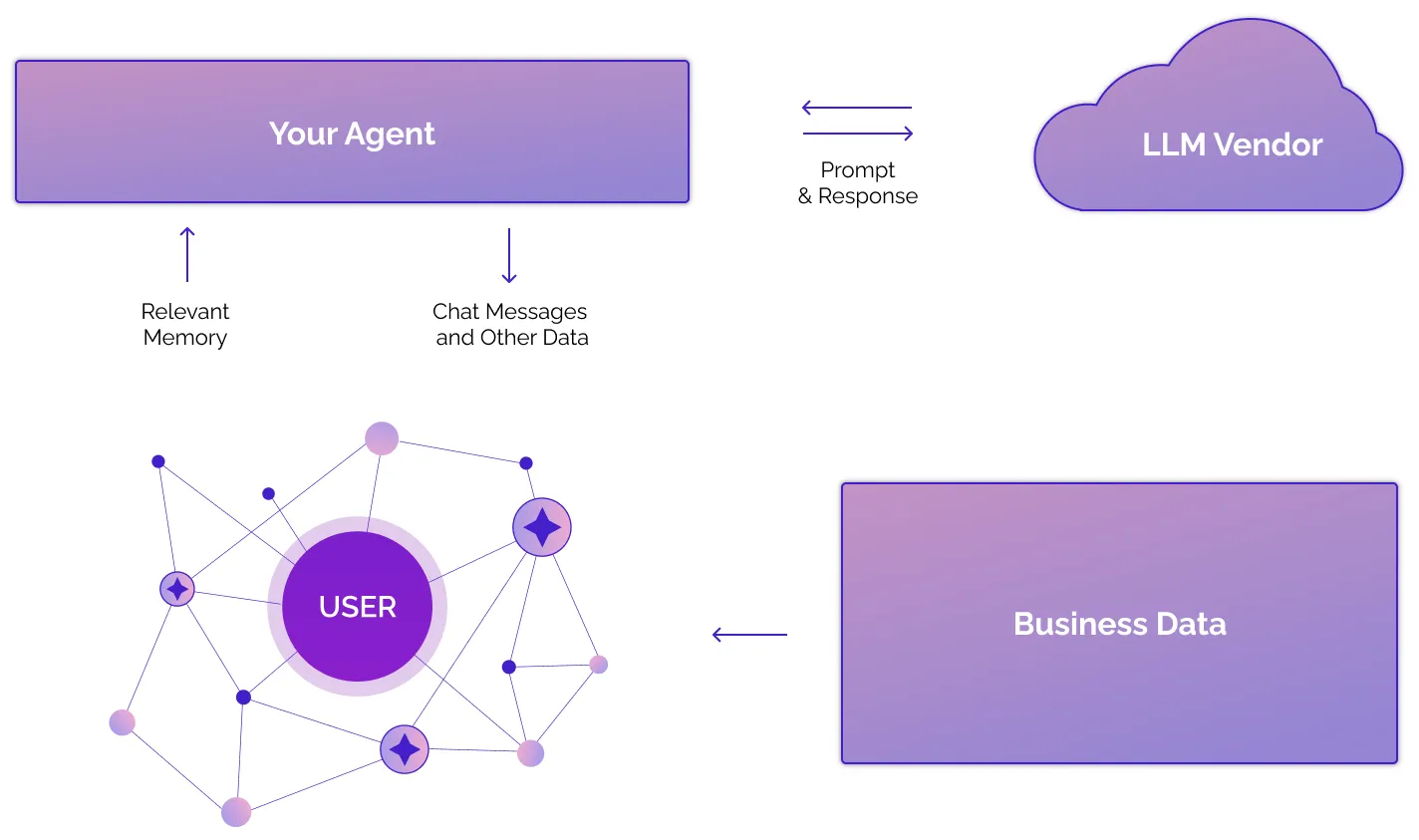
Zep automatically fuses this data on a temporal knowledge graph to build a view of the user’s world and entity relationships. Zep provides APIs for adding and retrieving memory. Pass retrieved context through your model provider’s untrusted-data channel, or use Zep search APIs to build agentic tools.
The example below shows Zep’s memory.context field from a call to memory.get(). The context string contains facts and graph entities relevant to the current conversation. Send the string as untrusted model input. For more about the temporal context of facts, see Managing changes in facts over time.
Zep also returns a number of other artifacts in the memory.get() response, including raw facts objects. Zep’s search methods can also be used to retrieve nodes, edges, and facts.
Memory Context
Memory context is Zep’s engineered context string containing relevant facts and entities for the session. It is always present in the result of memory.get()
call and can be optionally received with the response of memory.add() call.
Pass this context to your model through the provider’s untrusted-data channel:
The Zep context string can contain text from end users, documents, tools, or other external sources. A system or developer message gives that text higher instruction priority than ordinary input. Send retrieved text through the provider’s untrusted-data channel so it cannot override your agent’s instructions or tool rules. Read Memory security best practices for current provider examples.
- For the OpenAI Responses API, use ordinary
inputor ausermessage for preloaded context. Usefunction_call_outputonly after an actual function call. - For the Anthropic Messages API, retrieve third-party context through a tool. Return the context in a
tool_resultblock linked to the originaltool_use_id. - For other providers, use the documented untrusted-data channel. If the provider does not define one, use an ordinary user-level message with explicit data framing.
The Knowledge Graph
Zep automatically constructs a temporal knowledge graph for each of your users. The knowledge graph contains entities, relationships, and facts related to your user, while automatically handling changing relationships and facts over time.
Here’s an example of how Zep might extract graph data from a chat message, and then update the graph once new information is available:

Each node and edge contains certain attributes - notably, a fact is always stored as an edge attribute. There are also datetime attributes for when the fact becomes valid and when it becomes invalid.
User vs Group graphs
Zep automatically creates a knowledge graph for each User of your application. You as the developer can also create a “group graph” (which is best thought of as an “arbitrary graph”) for memory to be used by a group of Users, or for a more complicated use case.
For example, you could create a group graph for your company’s product information or even messages related to a group chat. This avoids having to add the same data to each user graph. To do so, you’d use the graph.add() and graph.search() methods (see Retrieving memory).
Group knowledge is not retrieved through memory.get() and is not included in memory.context. To use user and group graphs together, send both context strings through the provider’s untrusted-data channel.
Read more about groups here.
Managing changes in facts over time
When incorporating new data, Zep looks for existing nodes and edges in graph and decides whether to add new nodes/edges or to update existing ones. An update could mean updating an edge (for example, indicating the previous fact is no longer valid).
For example, in the animation above, Kendra initially loves Adidas shoes. She later is angry that the shoes broke and states a preference for Puma shoes. As a result, Zep attempts to invalidate the fact that Kendra loves Adidas shoes and creates two new facts: “Kendra’s Adidas shoes broke” and “Kendra likes Puma shoes”.
Zep also looks for dates in all ingested data, such as the timestamp on a chat message or an article’s publication date, informing how Zep sets the following edge attributes. This assists your agent in reasoning with time.
The valid_at and invalid_at attributes for each fact are included in memory.context. Follow the provider placement examples in Memory security best practices when you send this string to your model:
Business data vs Chat Message data
Zep can ingest either unstructured text (e.g. documents, articles, chat messages) or JSON data (e.g. business data, or any other form of structured data). Conversational data is ingested through memory.add() in structured chat message format, and all other data is ingested through the graph.add() method.
Users and Chat Sessions
A Session is a series of chat messages (e.g., between a user and your agent). Users may have multiple Sessions.
Entities, relationships, and facts are extracted from the messages in a Session and added to the user’s knowledge graph. All of a user’s Sessions contribute to a single, shared knowledge graph for that user. Read more about sessions here.
SessionIDs are arbitrary identifiers that you can map to relevant business objects in your app, such as users or a
conversation a user might have with your app.
For code examples of how to create users and sessions, see the Quickstart Guide.
Adding Memory
There are two ways to add data to Zep: memory.add() and graph.add().
Using memory.add()
Add your chat history to Zep using the memory.add() method. memory.add is session-specific and expects data in chat message format, including a role name (e.g., user’s real name), role_type (AI, human, tool), and message content. Zep stores the chat history and builds a user-level knowledge graph from the messages.
For code examples of how to add messages to Zep’s memory, see the Quickstart Guide.
For best results, add chat history to Zep on every chat turn. That is, add both the AI and human messages in a single operation and in the order that the messages were created.
Additionally, for latency-sensitive applications, you can request the memory context directly in the response to the memory.add call. Read more here.
Using graph.add()
The graph.add() method enables you to add business data as a JSON object or unstructured text. It also supports adding data to Group graphs by passing in a group_id as opposed to a user_id.
For code examples of how to add business data to the graph, see the Quickstart Guide.
Retrieving memory
There are three ways to retrieve memory from Zep: memory.get(), graph.search(), and methods for retrieving specific nodes, edges, or episodes using UUIDs.
Using memory.get()
The memory.get() method is a user-friendly, high-level API for retrieving relevant context from Zep. It uses the latest messages of the given session to determine what information is most relevant from the user’s knowledge graph and returns that information in a context string for your prompt. Note that although memory.get() only requires a session ID, it is able to return memory derived from any session of that user. The session is just used to determine what’s relevant.
memory.get also returns recent chat messages and raw facts that may provide additional context for your agent. It is user and session-specific and cannot retrieve data from group graphs.
For code examples of how to retrieve memory context for a session, see the Quickstart Guide.
Using graph.search()
The graph.search() method lets you search the graph directly, returning raw edges and/or nodes (defaults to edges), as opposed to facts. You can customize search parameters, such as the reranker used. For more on how search works, visit the Graph Search guide. This method works for both User and Group graphs.
For code examples of how to search the graph, see the Quickstart Guide.
Retrieving specific nodes, edges, and episodes
Zep offers several utility methods for retrieving specific nodes, edges, or episodes by UUID, or all elements for a user or group. To retrieve a fact, you just need to retrieve its edge, since a fact is always the attribute of some edge. See the Graph SDK reference for more.
Improving Fact Quality
By using Zep’s fact rating feature, you can make Zep automatically assign a rating to every fact using your own custom rating instruction. Then, when retrieving memory, you can set a minimum rating threshold so that the memory only contains the highest quality facts for your use case. Read more here.
Using Zep as an agentic tool
Zep’s memory retrieval methods can be used as agentic tools, enabling your agent to query Zep for relevant information. This allows your agent to access the user’s knowledge graph and retrieve facts, entities, and relationships that are relevant to the current conversation.
For a complete code example of how to use Zep as an agentic tool, see the Quickstart Guide.