
For AI agents: a documentation index is available at the root level at /llms.txt and /llms-full.txt. Append /llms.txt to any URL for a page-level index, or .md for the markdown version of any page.
PlaygroundDiscordStatusDashboardSign Up >
DocumentationSDK ReferenceGraphiti
  • Getting Started
    • Coding with LLMs
    • Key Concepts
    • Quickstart
    • Building an Agent Walkthrough
    • Memory
    • Projects
    • Users
    • Sessions
    • Groups
  • Working with the Graph
    • Understanding the Graph
    • Utilizing Facts and Summaries
    • Customizing Graph Structure
    • Adding Data to the Graph
    • Reading Data from the Graph
    • Searching the Graph
    • Deleting Data from the Graph
    • Debugging
  • Cookbook
    • Check Data Ingestion Status
    • Customize Your Memory Context String
    • Add User Specific Business Data to User Graphs
    • Share Memory Across Users Using Group Graphs
    • Get Most Relevant Facts for an Arbitrary Query
    • Find Facts Relevant to a Specific Node
  • Best Practices
    • Performance Best Practices
    • Adding JSON Best Practices
  • Ecosystem
    • LangGraph
    • Autogen
  • Migrations
    • February 2026 Deprecation Wave
    • Migrate from Mem0
  • FAQ
    • Frequently Asked Questions
  • Legal
    • Privacy Policy
    • Terms of Service
    • Website Terms of Use
LogoLogo
PlaygroundDiscordStatusDashboardSign Up >
On this page
  • Creating a Project
  • Project Essentials
Getting Started

Projects

Was this page helpful?
Previous

Users

Next
Built with
API keys are specific to a project. You can create multiple keys for a single project. Visit Project Settings in the Zep dashboard to manage your API keys.

Projects bundle elements like Users, Sessions, Groups, Knowledge Graphs, and settings, helping you organize data by service, environment (e.g., development or production), or other relevant criteria.

Creating a Project

When you sign up for Zep, your first project is automatically created. You’ll be asked to configure a few project-specific settings (details below). If you need more projects, you can create them anytime through the Zep Web App.
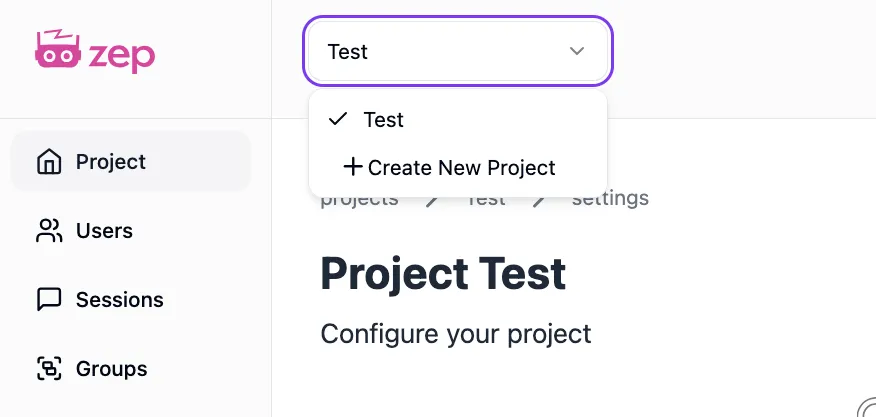
Create a new project

Project Essentials

  • Unique Project Name: Choose a unique name for your project.
  • Description (Optional): Optionally add a brief description of your project.

You can modify your project settings later from the Dashboard.