

Adding Episodes
Refer to the Custom Entity Types page for detailed instructions on adding user-defined ontology to your graph.
Adding Episodes
Episodes represent a single data ingestion event. An episode is itself a node, and any nodes identified while ingesting the
episode are related to the episode via MENTIONS edges.
Episodes enable querying for information at a point in time and understanding the provenance of nodes and their edge relationships.
Supported episode types:
text: Unstructured text datamessage: Conversational messages of the formatspeaker: message...json: Structured data, processed distinctly from the other types
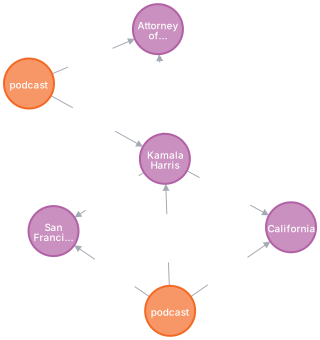
The graph below was generated using the code in the Quick Start. Each podcast is an individual episode.
Adding a text or message Episode
Using the EpisodeType.text type:
Using the EpisodeType.message type supports passing in multi-turn conversations in the episode_body.
The text should be structured in {role/name}: {message} pairs.
Adding an Episode using structured data in JSON format
JSON documents can be arbitrarily nested. However, it’s advisable to keep documents compact, as they must fit within your LLM’s context window.
For large data imports, consider using the add_episode_bulk API to
add multiple episodes in one call.
Loading Episodes in Bulk
Graphiti offers add_episode_bulk to add multiple episodes in one batch. Use
this method for bulk loading. The bulk path resolves invalidated edges and
extracts temporal dates before it saves the results.