

Using LangGraph and Graphiti
A Jupyter notebook version of this example is available on GitHub.
Looking for a managed Graphiti service? Check out Zep Cloud.
- Provides a managed context layer for agents.
- No need to run Neo4j or other dependencies.
- Adds features for startups and enterprises.
- Provides managed ingestion and retrieval.
The following example demonstrates building an agent using LangGraph. Graphiti is used to personalize agent responses based on information learned from prior conversations. Additionally, a database of products is loaded into the Graphiti graph, enabling the agent to speak to these products.
The agent implements:
- persistence of new chat turns to Graphiti and recall of relevant Facts using the most recent message.
- a tool for querying Graphiti for shoe information
- an in-memory
MemorySaverto maintain agent state.
Install dependencies
Ensure that you’ve followed the Graphiti installation instructions. In particular, installation of neo4j.
Configure Graphiti
Ensure that you have neo4j running and a database created. You’ll need the following environment variables configured:
Generating a database schema
The following is only required for the first run of this notebook or when you’d like to start your database over.
clear_data is destructive and will wipe your entire database.
Load Shoe Data into the Graph
Load several shoe and related products into the Graphiti. This may take a while.
This only needs to be done once. If you run clear_data you’ll need to rerun this step.
Create a user node in the Graphiti graph
In your own app, this step could be done later once the user has identified themselves and made their sales intent known. We do this here so we can configure the agent with the user’s node_uuid.
Helper Functions and LangChain Imports
get_shoe_data Tool
The agent will use this to search the Graphiti graph for information about shoes. We center the search on the manybirds_node_uuid to ensure we rank shoe-related data over user data.
Initialize the LLM and bind tools
Test the tool node
Chatbot Function Explanation
The chatbot uses Graphiti to provide context-aware responses in a shoe sales scenario. Here’s how it works:
-
Context Retrieval: It searches the Graphiti graph for relevant information based on the latest message, using the user’s node as the center point. This ensures that user-related facts are ranked higher than other information in the graph.
-
Instruction and data separation: It keeps stable instructions in a system message and sends Graphiti facts as user-level reference data.
-
Knowledge Persistence: After generating a response, it asynchronously adds the interaction to the Graphiti graph, allowing future queries to reference this conversation.
This approach enables the chatbot to maintain context across interactions and provide personalized responses based on the user’s history and preferences stored in the Graphiti graph.
Setting up the Agent
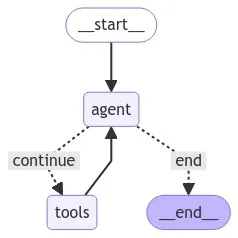
This section sets up the Agent’s LangGraph graph:
-
Graph Structure: It defines a graph with nodes for the agent (chatbot) and tools, connected in a loop.
-
Conditional Logic: The
should_continuefunction determines whether to end the graph execution or continue to the tools node based on the presence of tool calls. -
Memory Management: It uses a MemorySaver to maintain conversation state across turns. This is in addition to using Graphiti for facts.
Our LangGraph agent graph is illustrated below.
Running the Agent
Let’s test the agent with a single call
Viewing the Graph
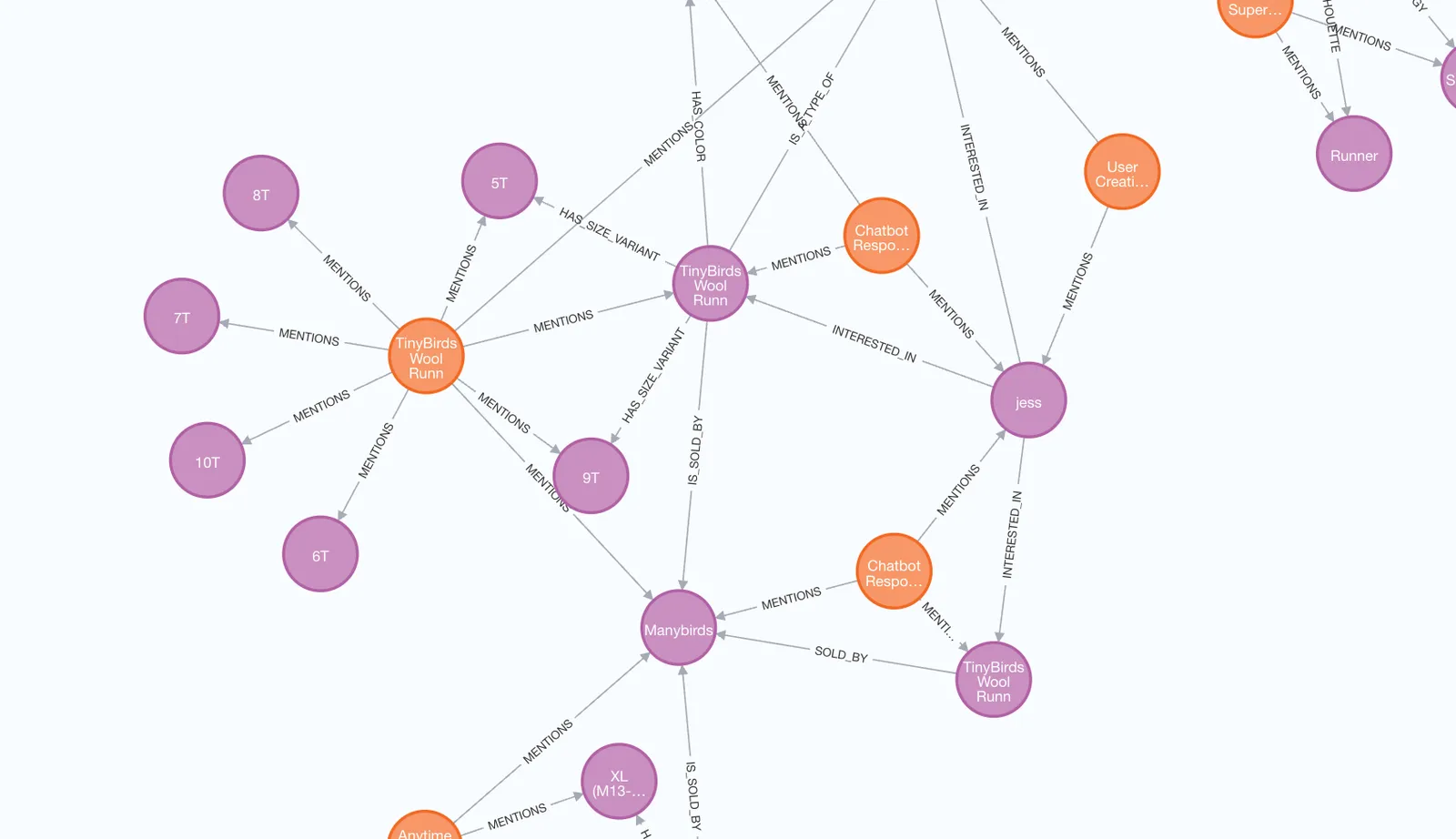
At this stage, the graph would look something like this. The jess node is INTERESTED_IN the TinyBirds Wool Runner node. The image below was generated using Neo4j Desktop.
Running the Agent interactively
The following code will run the agent in a Jupyter notebook event loop. You can modify the code to suite your own needs.
Just enter a message into the box and click submit.