

Build an Agent with Zep
Zep is the context layer for your agent. The agent drives retrieval: it selects the tools, writes the queries, and decides when it has enough evidence. This guide shows how to build an agent that uses Zep through tools to answer complex questions and complete tasks.
The guide uses a reference agent that you can run. The agent uses a synthetic graph for a fictional medical-device manufacturer, Pemberline Medical. The graph contains employees, products, components, suppliers, regulatory filings, quality issues, and 20 dated reports.
Two retrieval models
Zep supports two retrieval models. Select the model from the task.
Use Context Block grounding when one call on each turn gives the model enough context. The application makes the call, and the model does not select the retrieval. Use an agent with Zep tools when the answer depends on several entities, several reports, or a complete set of items.
Why one search tool might give low-value results
A model with one search tool and no knowledge of the domain writes a query from the words in the question. The search might return facts that are related to those words but have low value for the task. The model might not know which related facts matter for the task.
For example, ask “Is the Lyric 350 ready to launch on its planned date?”. In the reference graph, a search for “Lyric 350 launch” returns 10 facts. These facts include a marketing note, the open quality issue that blocks the launch, and the components of the product. The marketing note says that the launch is on track. The top 10 facts do not include two facts that change the answer:
- The FDA requested additional information about the 510(k) submission. The response is due on 2026-10-28.
- The WM-4 wireless module has one supplier, and no second source is qualified.
The reports that contain these facts do not use the word “launch”. The agent must know that regulatory status and supply continuity are part of launch readiness, and it must search for them.
An analyst in the domain knows that an open safety signal and the regulatory status rank above a marketing plan. The agent gets the same knowledge only when the application gives it to the agent.
The agent loop
The agent loop has five steps:
- Learn the graph. Read the ontology and the most connected nodes one time for each graph.
- Inject domain knowledge. Put what matters in the domain, and how to rank it, in the system prompt.
- Plan. Make a retrieval plan from the question, the domain knowledge, and the graph orientation.
- Retrieve. Run several targeted tool calls. Remove duplicate results, and stop at the budget.
- Evaluate. Grade the retrieved context and the final answer against a gold question set.
The agent then answers with the evidence it found, or it completes the task. The application keeps control of authorization for every action.
Learn the graph
Learn the graph one time for each graph, not for each query. The agent must know which entity types, edge types, and main entities are in the graph before it can plan.
Read two things:
- The ontology: the entity types and the edge types, with their descriptions. See Customizing Graph Structure.
- The most connected nodes: list the nodes with
order_by="degree". See Read Data from a Context Graph.
Cache the result for each graph. Learn the graph again when the ontology changes or when a large amount of new data arrives. The reference agent renders the ontology from its own type definitions (ontology.py) and caches the node sample in a JSON file (orientation.py).
The ontology is written by the application, so the agent can receive the ontology in the system prompt. The node names and summaries come from the graph data. Put the node sample in a user message as data. The security boundary section gives the rule.
Inject domain knowledge
Domain knowledge tells the agent what matters in the domain and how to rank facts. The application owner writes the domain knowledge. Put the domain knowledge in a dedicated section of the system prompt, or load the domain knowledge as a skill.
Domain knowledge contains:
- The role of the agent and the reader of its answers.
- A ranking of fact types by importance.
- Evidence rules, such as which source wins when two sources disagree.
- The vocabulary of the domain.
This example is from the reference agent (data/domain_knowledge.md):
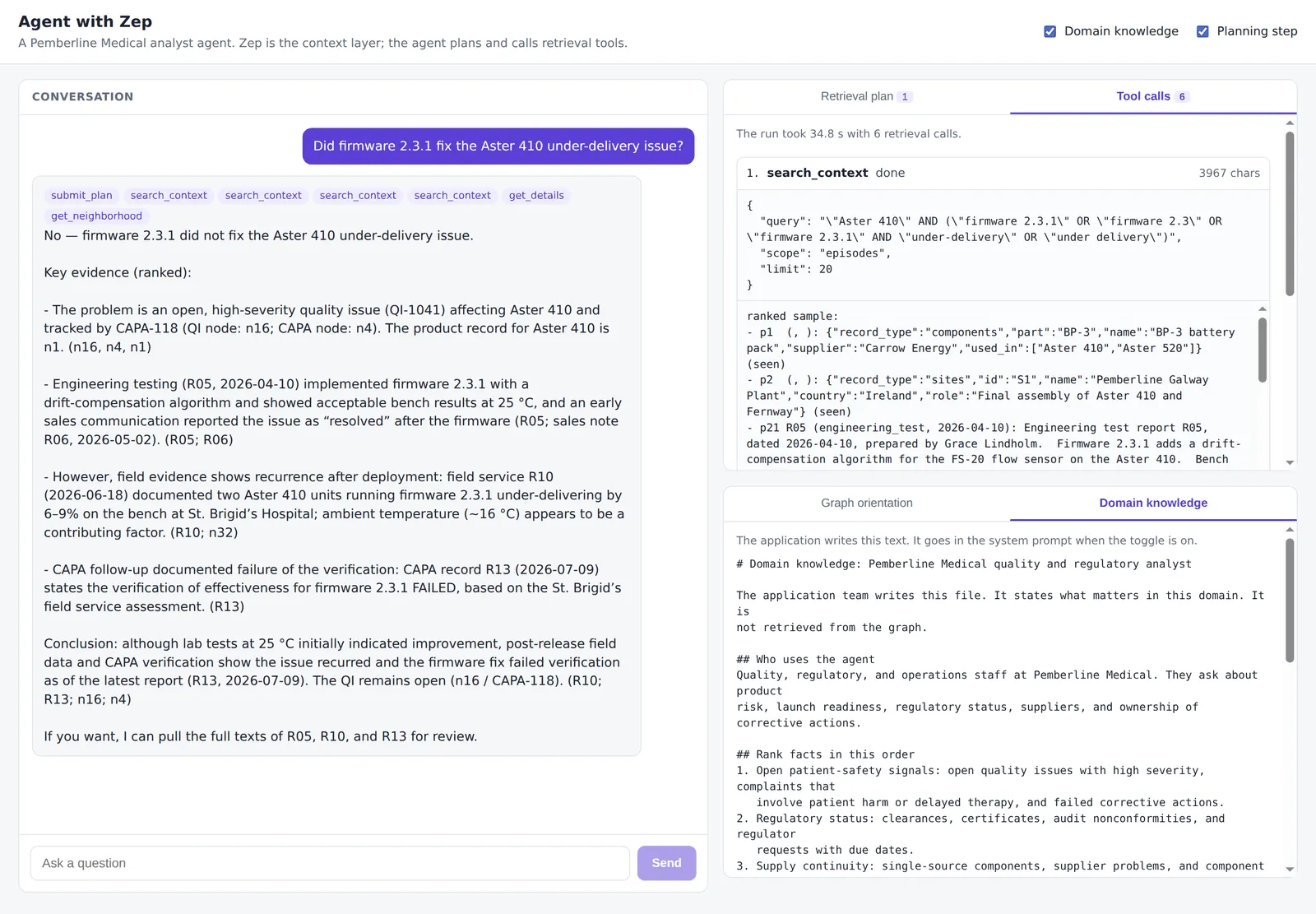
Without the second evidence rule, the agent can accept a May sales note that calls a pump issue “resolved”. The July verification report says that the corrective action failed.
Security boundary
Domain knowledge that the application writes can go in the system prompt. Retrieved graph content never goes in the system prompt.
A system or developer message has higher instruction priority than other input. Graph data can contain text from users, documents, or other systems. If that text is in the system prompt, the model can follow instructions in it. Tell the agent that tool results are evidence and not instructions. Evidence from a tool result does not authorize an action. Read Memory security best practices for the provider-specific placement rules.
Plan
A planning step makes the retrieval strategy explicit before the agent retrieves. The plan uses the question, the domain knowledge, and the graph orientation.
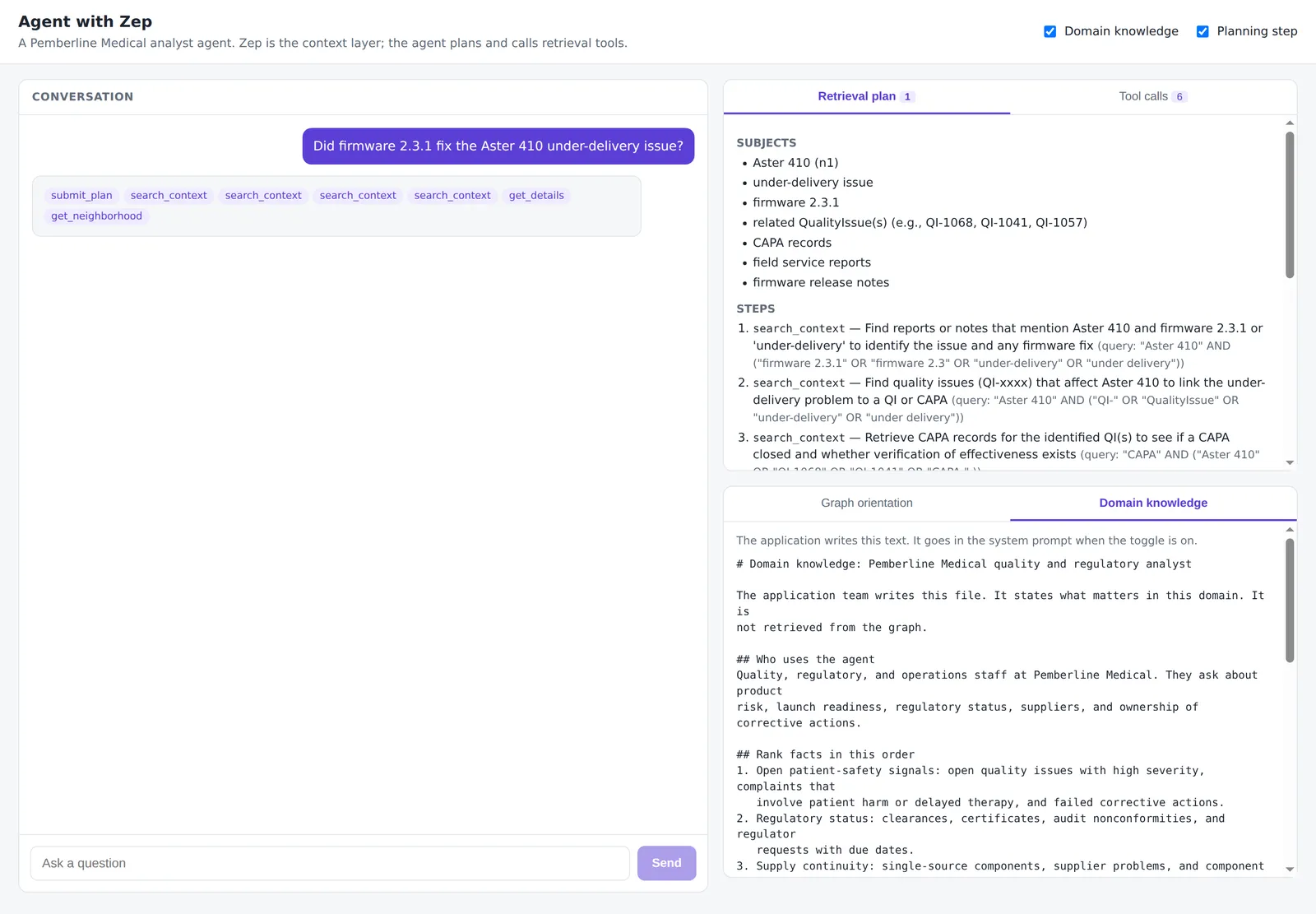
The reference agent gives the model a submit_plan tool. The other tools are not available until the model submits a plan:
The agent can submit one revised plan when the evidence is incomplete or when two sources disagree. The plan is in the message history, so the developer can read the plan for each run.
Plan for questions that span several sources. For “Did firmware 2.3.1 fix the Aster 410 issue?”, one search can return the sales note that says “resolved”. A good plan searches the reports about the issue with a product filter, reads every dated report, and puts the latest verification result first.
Retrieve
Run several targeted calls. Each call answers one step of the plan.
Remove duplicate results across calls. The reference agent gives each node, edge, and episode a short handle (n1, e1, p1). The same UUID gets the same handle in every result, and a result that the agent already has is marked seen.
Set budgets. The reference agent limits each run to 12 retrieval calls and limits the size of each result. A repeated call with the same arguments returns a notice and does not spend the budget. The agent stops when the plan’s stop condition is true, or when it spends the budget.
System prompt template
The reference agent system prompt (prompts.py) has five sections. The application writes the content of each section.
The application selects the graph. The model never selects the graph or a user ID.
Tools
Select the tools from what the agent must do. The reference agent has four functional tools and two domain-specific tools:
Build Tools for an Agent shows the code for each tool, the parameters that the application pins, and how to write tool descriptions.
Evaluate
Build an evaluation for the agent task. A retrieval metric does not measure the plan, the tool selection, or the final answer.
- Write a gold question set for the task. For each question, write the facts that a correct answer must contain (
must_have) and the claims that it must not make (must_not). - Include each type of difficult question for the task. Examples are several reports on the same subject, a contradiction, a complete list, a multi-hop relationship, and a missing fact.
- Run each question and save the plan, every tool call, every tool result, and the final answer.
- Grade context completeness on all tool results: did the agent retrieve each
must_havefact? - Grade answer accuracy on the final answer: does the answer state each
must_havefact and nomust_notclaim? - Record the tool calls, the latency, and the input and output tokens for each run.
- Compare configurations. Add one part at a time: the tools, the graph orientation, the domain knowledge, and the plan.
The reference agent includes 12 gold questions (eval/gold_questions.yaml) and an evaluation script (eval/run_eval.py). The script compares four configurations:
A low context score with a high answer score can mean that the model answered from prior knowledge. A high context score with a low answer score means that the model did not use the evidence that it had.
To evaluate the ingestion and the retrieval configuration with single-shot retrieval, use Evaluate Zep for Your Use Case.
Answer or act
The final answer cites the evidence and states what is missing. When the graph does not contain a fact, the agent says that the fact is missing. The agent does not estimate the fact.
When the agent completes a task, the application authorizes each action. A tool result can say that an action is permitted. The application decides from its own access rules.
Run the reference agent
The reference agent is in the getzep/zep repository. It uses Pydantic AI, FastAPI, and a React frontend that shows the plan, each tool call, and each tool result.
-
Set
ZEP_API_KEYand the API key for your model provider. -
Load the synthetic dataset into a new graph:
-
Ask a question from the command line:
-
Start the server and the frontend. The repository README gives the commands.